
Introducing: Eyeware Sense to reduce mouse movements, human presence detection, privacy protection and the eye tracker challenge
Make your mouse appear where you look with Eyeware Sense (the precursor of the Beam Eye Tracker). This AI-powered webcam app reduces mouse movements instantly, making the cursor appear where you look, even on multiple displays.
Increase your productivity and add security features like human presence detection and privacy filters. For the daring among you, you can even try the eye tracker challenge using the gaze highlighter feature.
We are pleased to announce the release of our latest product: Eyeware Sense. A productivity and security software that works on any Windows PC with a webcam. Eyeware Sense uses advanced eye-tracking technologies to deliver a seamless computer interaction experience. The app is an adaptation of the successful AMD Privacy View app released with the AMD Radeon Software suite this year.
Eyeware Sense contains a suite of features such as a multi-screen pointer feature where your mouse appears on the monitor that you’re looking. The presence detection technology and privacy view feature help keep onlookers from seeing your entire screen or reading your data. The mouse warping feature can help reduce swiping movements on the mouse pad. For YouTubers, streamers, and creators the gaze highlighter feature allows participating in the eye tracking challenge without having to acquire an external eye tracker device for hundreds of dollars.
Availability
At launch, Eyeware Sense was sold as a subscription. It is no longer offered.
Features
There are several features available within the application that can be activated separately.
Multi-Screen Pointer
Are you tired of moving the mouse pointer between multiple displays all day? Reduce mouse movements instantly.
When the Multi-Screen Pointer feature is enabled, your mouse pointer jumps to the screen that you are looking at!
Mouse Warping
Have you ever lost your mouse pointer on a large screen or wanted it to already be where you need it without swiping the mouse pad? Now you can make the cursor appear where you look by placing your finger on the mouse pad, using a keyboard shortcut, or assigning an extra mouse key to the mouse action. Over time it will become second nature and reduce mouse movements in Windows so you stop swiping that mouse pad.
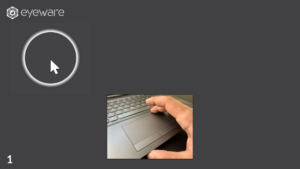 |
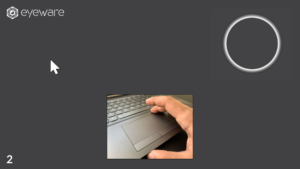 |
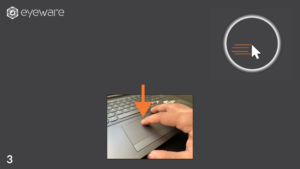 |
Presence Detection
Did you forget to lock your computer when you walked away? No problem, with the human presence detection feature enabled, your computer can lock automatically when you step away.
Privacy View
Enable privacy view to hide parts of the screen that you are not looking at. This helps keep onlookers from reading sensitive information while you are working.
Gaze Highlighter
Show others where in the display you are looking at to bring their attention to the content that you are focusing on. This feature is useful when you are sharing your screen. Or try the eye tracking challenge or try not to laugh challenge and share engaging content with your audience or friends and family.
Stay connected
Eyeware Sense was made to improve productivity on single or multiple screens, increase privacy in public settings and make the eye tracking challenge easy to join. To hear what Eyeware builds next, subscribe to our newsletter.